How trades work
A trade is a listing that asks for games instead of money. You publish yours, people propose theirs, and you pick. Ludāgora charges nothing on a trade.
It is the third way to publish, alongside an auction and a direct sale, and it is the one that stays open all year — including for the games that found no match in the Swap-a-ton.
The video is the whole walkthrough. The rest of this page is the same thing, step by step.
What to know up front
- One game closes for one game. Even if you are asked about three, the person who published accepts exactly one.
- Nobody pays a commission. No money passes through a trade, so there is nothing to charge.
- Each side ships its own. Two parcels, each paying its own postage.
- Accepting is final. It closes the listing, opens the deal, and drops every other proposal.
- The comments are part of the negotiation. The listing's buttons carry it step by step, and the comments are there to ask, offer and come to an agreement. They are public: contact details cross when the two of you decide.
Publishing a trade
Go to Publish free, pick your game and its edition, and under Listing type choose Trade.
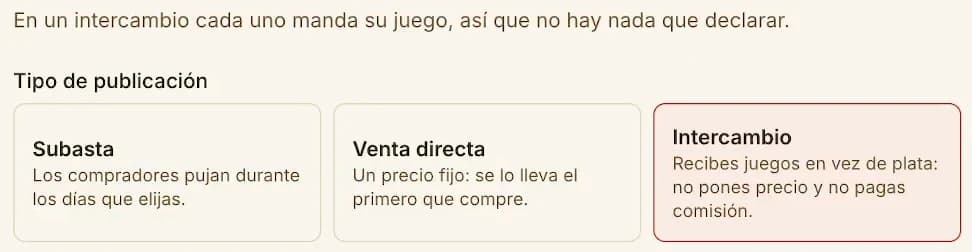
Picking it removes the price and the duration: a trade has no price and never expires. Shipping goes too, because in a trade each side ships its own game.
What you would take in exchange
You can name up to 12 games you would like to receive. Add them by hand with Add a game, or pull your list in at once with Pull from my Wishlist.
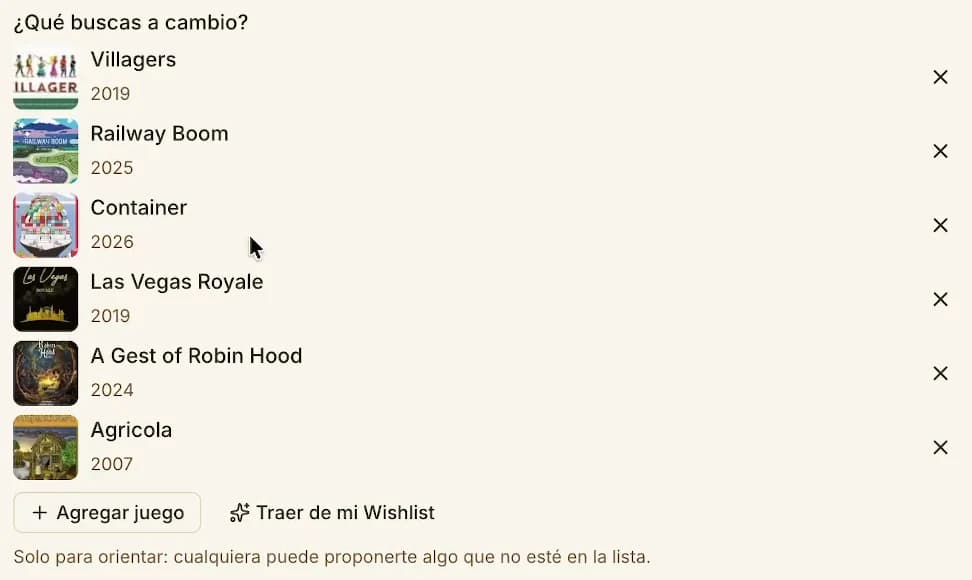
That list only points the way. It is not a filter: anyone can propose something that is not on it, and it is still worth your look. Games that are on your list show up flagged to whoever proposes, so they know you will pay attention.
Leave Take proposals on if you want to be proposed to freely. Turning it off closes new proposals; negotiations already under way carry on.
Your game's condition and photos
Same as any listing: the real condition, a description saying what it includes and what it is missing, and your own photos of the game. Not photos off the internet.
Once published, your game shows Trade where a price would go.
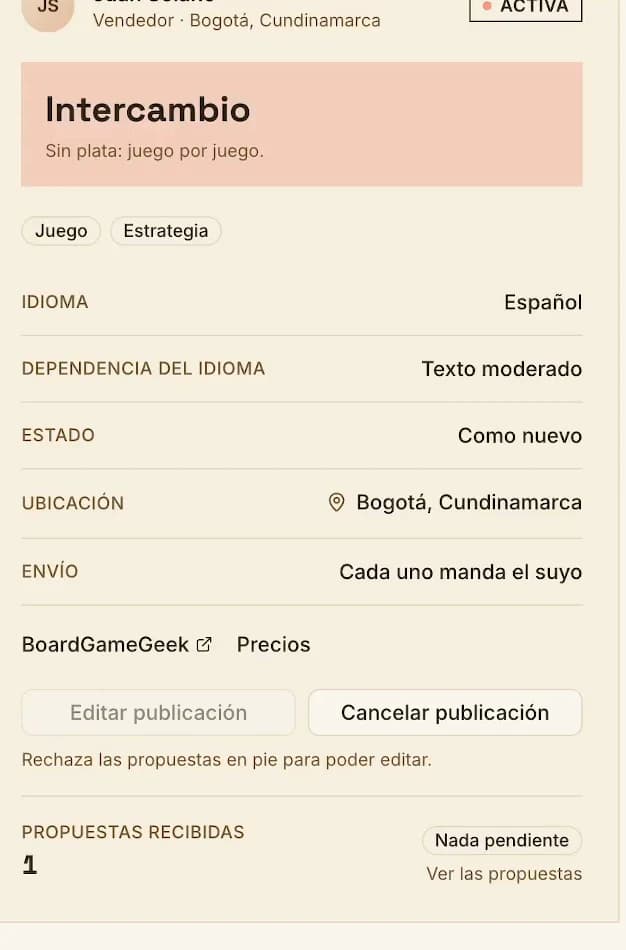
You can edit it while no proposal is standing. If one is, decline it first.
Proposing a trade
On the other side, the listing has no money field — it has a picker for your games.
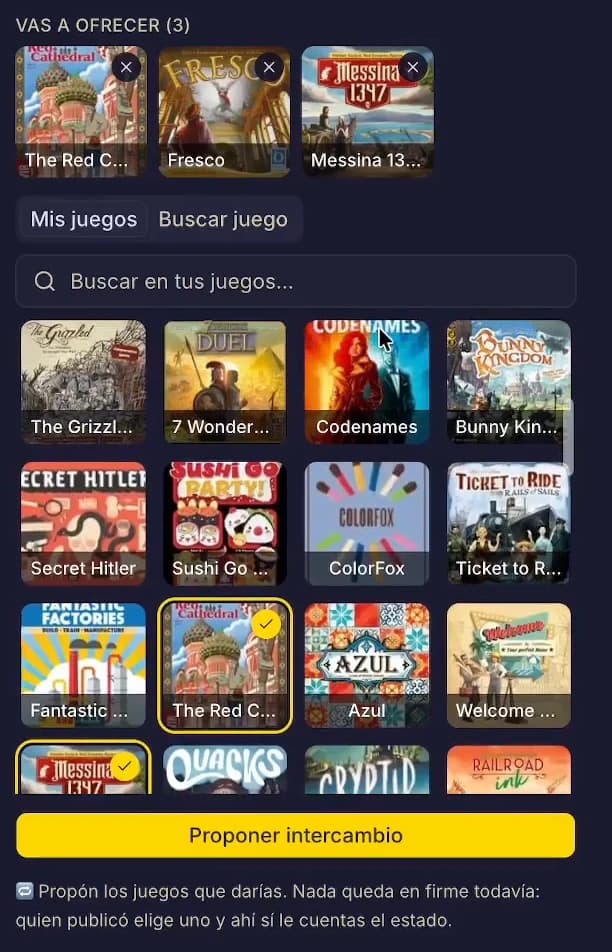
There are two tabs:
- My games — your BoardGameGeek collection, the part you have marked as owned. If you have not linked your account, the form to do it appears right there. And if BGG is slow, we show the last copy we stored, which can be up to two weeks old.
- Search a game — the full catalogue. You do not need a BGG account to propose: this is where you add any game, whether or not it is in your collection.
Games the publisher is looking for come first, flagged They're looking for it.
Tick everything you would be willing to give — one minimum, no maximum — and press Propose a trade. The more you put in, the better the odds something fits.
At this point you upload nothing: a proposal is box art and names. Condition and photos come later, and only for the games they care about.
If you propose again, your new proposal replaces the previous one entirely.
The publisher asks for details
The publisher gets the notification and sees your proposal.
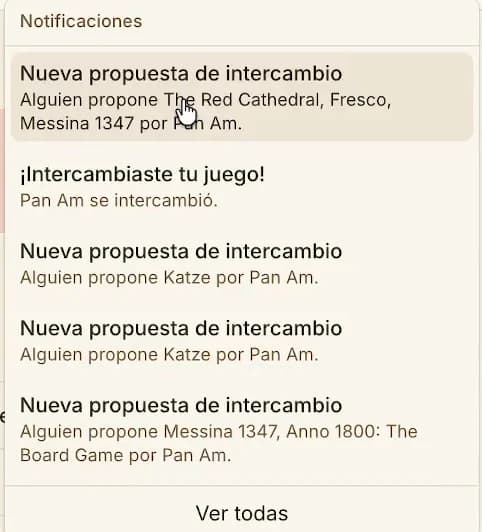
From there they have two moves: Ask for details on the games that interest them, or Decline.
Ticking several is not a commitment to take several. It is asking about several in order to keep one. Whatever they do not tick is out.
One game for one game
This is the part people misread, so plainly: a trade closes one game for one game. Being asked about three is not a three-for-one trade — it is three games being looked at so one can be chosen.
There are no multi-game trades yet. Giving several games for several is something we want to add later, and when it exists it will ask both sides for explicit consent — it will not fall out of ticking several games here.
If they decline, that negotiation ends there, but the listing stays active: you can propose something else.
Describe your games
Now you describe — and only the games you were asked about. Each one gets a Fill in condition button of its own.
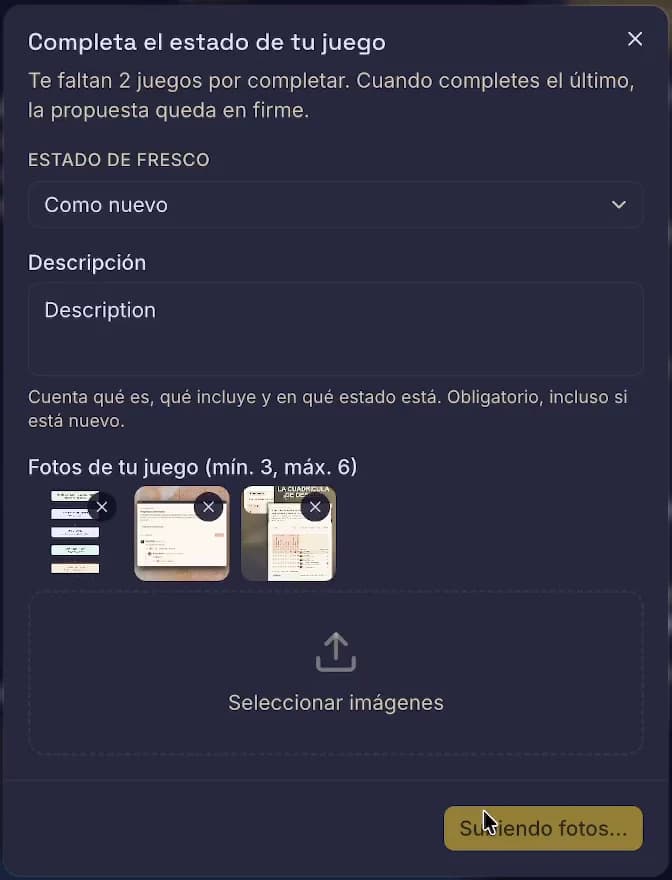
Each one needs all three:
| What | How much |
|---|---|
| Condition | You pick it; it starts unset |
| Description | Always required, even when the game is new |
| Photos | At least 2 if new, at least 3 if used, 6 maximum |
Fill them in any order you like. When you finish the last one, your proposal becomes binding — and from that moment the publisher can accept at any time without asking you again. Describe every game as though the trade will be made with that one.
Exchanging contact before closing
Sometimes you need to talk before deciding. The publisher can ask for contact details with Get in contact, at any point in the negotiation.
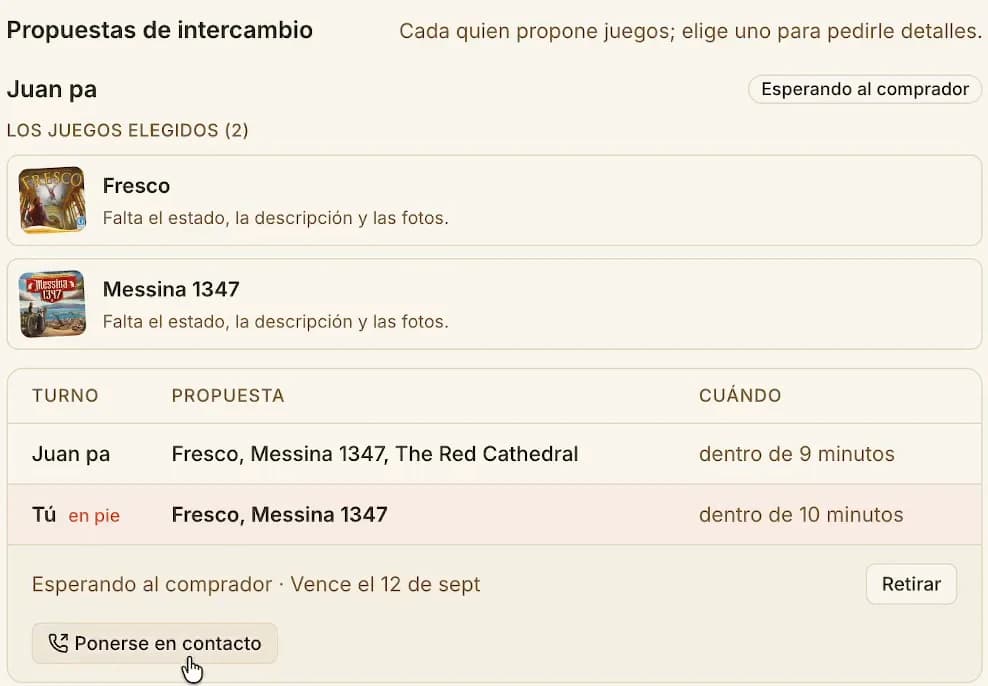
Exactly how it works:
- Only the publisher can ask. The person proposing cannot.
- Only the person proposing answers, with Share my details or No thanks.
- What crosses is phone and Facebook, filtered by what each person allows in their profile. Not the address — that is shared when the trade closes.
- A "No thanks" is final for that negotiation. It cannot be asked again.
- No notification is sent for this, neither for the ask nor for the answer. If you are negotiating, come back and check your proposals.
And one warning meant seriously: settle it off-platform and Ludāgora keeps no record of the trade. With no deal closed in the app there is no rating and no reputation for either of you. Close the trade here.
Accepting closes the trade
Every game you have described gets its own Accept this one button. There is deliberately no general button: what gets accepted is a game with a name.
The moment they accept one:
- The listing reads Traded and closes.
- The deal opens between the two of you.
- Contact details and addresses cross, both ways.
- Every other proposal on that listing closes itself.
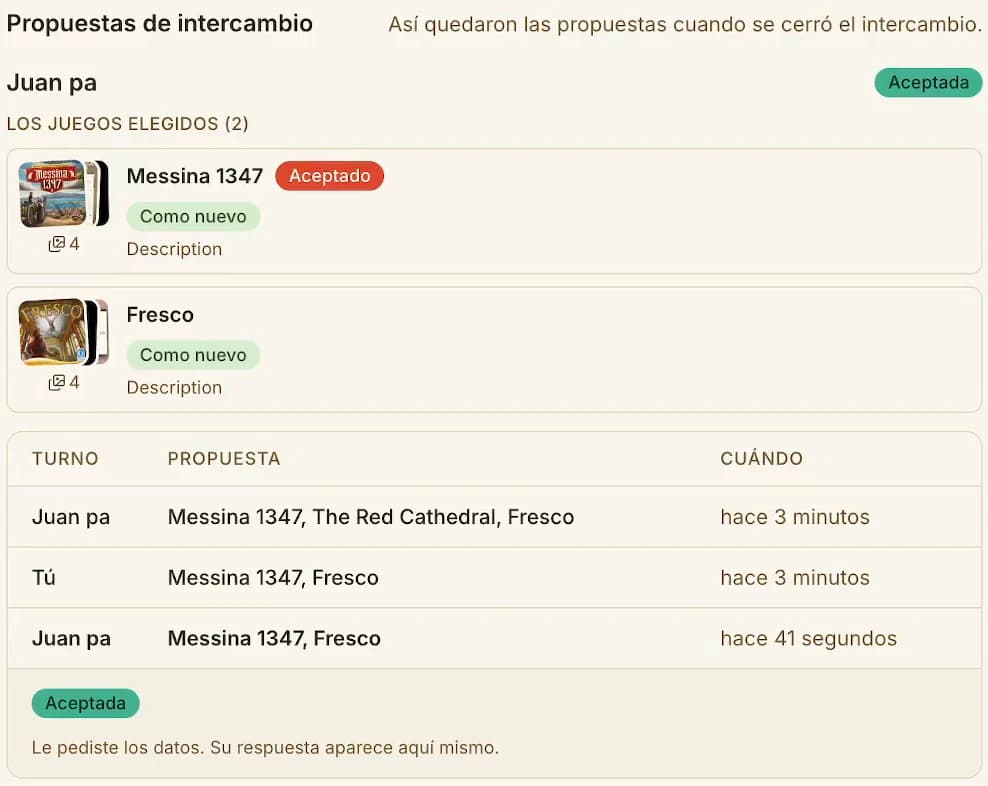
This does not come undone. After that each side ships its parcel and marks its half of the deal on arrival — or raises a problem if something went wrong. You have 14 days to close it.
Turns and deadlines
A negotiation has one open turn at a time, and it alternates. Whoever holds the turn is the only one who can move:
| Moment | Whose turn | What they can do |
|---|---|---|
| A proposal arrived | The publisher | Ask for details, or decline |
| Details were asked for | The proposer | Describe the games they were asked about |
| The proposal became binding | The publisher | Accept one game, or decline |
Each turn expires in 5 days (the window we ship by default). The date shows in the negotiation as Lapses …. On expiry that negotiation ends and whoever was left waiting for the answer is emailed. You can propose again: that is a new turn.
The proposer can Withdraw their proposal while nobody has answered it.
Before you propose or accept
- Read the photos and the description, not just the grade. "Like new" says little; the description is what tells you what that copy is missing.
- Being asked about three games is not a three-game trade. You will hand over one.
- Check who you are trading with: their profile, their ratings, how long they have been on Ludāgora.
- Never put contact details in the comments. A listing's comments are public.
- If you have old deals left unmarked, you will not be able to propose until you close them.
Quick questions
| Question | Answer |
|---|---|
| What does it cost? | Nothing. A trade pays no commission. |
| Do I need a BoardGameGeek account? | No. Search a game proposes anything in the catalogue. |
| Can I ask for cash on top? | Not today: a trade closes game for game. |
| How many games can I propose? | As many as you like, one minimum. |
| How many can be accepted? | One. |
| Who pays shipping? | Each side its own. |
| Does my listing expire? | No. Each turn in a negotiation does, after 5 days by default. |
| Can I close off proposals? | Yes, by turning Take proposals off. Open negotiations carry on. |
Something not adding up? Write to us.